

How To Create Unique Password In Hikvision Camera
This article will show you how to reset the password for Hikvision NVR, DVR, or IP camera. In case yous have lost or forgotten the password, so simply follow this guide.
There are a few methods of how the Hikvision password reset can be washed and all these methods depend on the manufacturing appointment and model.
The older Hikvision devices can be reset using the password generator tool, the newer ones can be reset using another tool that exploits a software issue on the Hikvision platform.
The newest version is able to exist reset using the export mode through the SADP tool (sending the lawmaking to the Hikvision support team or to your dealer/reseller). Here we'll explain these methods, proceed trying and observe out which one works in your case.
How to Reset the Password of a Hikvision photographic camera (DVR, NVR)
There are two components in resetting the password of a Hikvision device. First, you need to place the serial number of the unit and you'll employ this serial number to create a reset code.
Second, if you're trying to reset a DVR or an NVR, you may need to use the organization'due south date which is the timeframe. This is easy to discover, just cheque the cameras' feed on the monitor and note the date stamped on the video.
How to get the series number for the Hikvision device
Basically, you demand to locate and note the serial number of your device (IP camera, DVR, NVR). Yous can find this series number on the label/sticker fastened to your photographic camera or your recorder.
Another method is to use the Hikvision SADP tool to remember the serial number. This tool will scan your local network and listing all the Hikvision devices establish on the network. It also shows specif data such as the IP address, model of the unit of measurement, serial number, etc.
You need to download and install the SADP tool (get the SADP on this link, install version two.0). Afterwards the SADP is installed in your computer/laptop, run information technology and all your Hikvision devices on the network will exist listed in that location.
The serial number of each device (camera, NVR, DVR) is nether the Device Serial Number column (bank check the picture below). Yous demand to copy that use it in the adjacent steps.Note: You must install the SADP version two.0, sometimes called "the sometime SADP".

Note the serial number marked with the red circle. Re-create it considering we volition demand the next steps.
Method 1. Reset Hikvision Countersign using the Password Generator tool
This tool may or may not work for your IP camera, NVR or DVR. Delight follow the instructions very advisedly and be precise in all your inputs into the tool.
Devices on newer firmware require a more secure password reset procedure (this method won't piece of work). This tool will only work with cameras running firmware older than 5.iii.0. And for the recorders (NVR or DVR) manufactured prior to 2017. Won't work for annihilation newer, only information technology's worth trying if you lot don't know when the unit is manufactured.
Access the Hikvision Password Generator . Enter the device's serial number and the electric current engagement on the photographic camera or NVR (this is important, the entered date must be correct).
Important Note: Some Hikvision devices (perhaps simply NVRs) show their model number appended to the kickoff of their serial numbers. You lot may need to remove this from the serial number that you lot enter into the tool. For example, if the serial number shows equally DS-7208HVI-ST0123456789AAWR987654321WCVU and the device's model number is DS-7208HVI-ST, then the true serial number is 0123456789AAWR987654321WCVU which the one that you need to use on the password generator.

One time y'all get the generated code from the tool to a higher place you must enter it on the SADP software and reset the password. Note yous need to install the SADP version 2.0 to perform this reset (uninstall whatsoever previous versions). Select the camera and enter the Secure code on the box. Subsequently the reset is done the countersign will exist 12345.

Method ii. Use Hikvision Countersign Helper
This small software is developed past bp2008 on Gitbub and exploits a backdoor found on Hikvision devices. Download the software here (google drive link) and have it installed on your computer/laptop.
Information technology doesn't work for all the firmware versions, but may it will work for yours. Nothing to lose if you give information technology a shot. Information technology works for Hikvision firmware versions listed beneath:
- + V5.ii.0 build 140721 – Vulnerable
- + V5.2.0 build 141016 – Vulnerable
- + V5.3.0 build 150513 – Vulnerable
- + V5.iii.3 build 150514 – Vulnerable
- + V5.iii.half-dozen build 151105 – Vulnerable
- + V5.three.8 build 151224 – Vulnerable
- + V5.3.5 build 161112 – Vulnerable
- + V5.4.0 build 160401 – Vulnerable
- + V5.4.0 build 160520 – Vulnerable
- + V5.4.ane build 160525 – Vulnerable
- + V5.4.0 build 160530 – Vulnerable
- + V5.4.iii build 160705 – Vulnerable
- + V5.4.iii build 160808 – Vulnerable
- + V5.iv.iv build 161125 – Vulnerable
- + V5.3.9 build 170109 – Vulnerable
- – V5.one.half dozen build 140412 – Not Vulnerable (to ICSA-17-124-01)
- – V5.4.3 build 170123 – Non Vulnerable
- – V5.4.v Build 170123 – Non Vulnerable
- – V5.four.3 build 170217 – NOT Vulnerable
There are 5 simple steps to reset the password using this tool, and y'all can even skip steps three and 4 in many cases. Connect your camera on the network, locate the IP of the photographic camera using the SADP tool and become the HTTP port as well (default i is 80).
Blazon the IP accost and the port on the tool. And so click Become User List and choose the admin account from the listing.
Set a new password and click "Reset Password for selected user". After that, your camera will have your new password or it volition become defaulted to password "12345abc". Effort both of them to come across which 1 works.

Method 3. Reset Hikvision Password by sending an e-mail to the Hikvision Support Team or your local dealer/reseller
This method works by sending out an e-mail containing the Hikvision device's serial number and having the Hikvision team or your dealer reply dorsum with a reset password.
Before you start, you lot cannot use the one-time version of SADP for this method. Uninstall the former SADP and download the new version (looks like the screenshot below).
Footstep 1: Open up SADP and select the camera or NVR you want to reset by ticking the box next to the device on the left side of the list and then click the Forgot Password link at the lesser of the pop-out tab on the right of the SADP window.

Footstep two: Click the Export button on the popular-up to consign the reset file and then select a binder to save the file to that is piece of cake to observe. One time you have exported the reset file the camera/NVR y'all are resetting must remain powered ON until the reset is consummate.
 Step three: Open your emails and attach the reset file to a new e-mail, send this file to the Hikvision support squad or your local dealer/reseller. They'll verify your purchase and transport dorsum a reset lawmaking. Once yous become a answer from them, follow the next step.
Pace 4: Open SADP and return to the consign pop-upwards from earlier, this time you will desire to become to step 2 and tick the Import File box, then click the folder icon and find the reset file nosotros simply sent you, open information technology so the file road appears in the box like beneath, finally enter the new password twice and and then click Confirm.
 Afterwards clicking confirm a box should appear with a greenish tick and the words Reset Password Succeeded.
 With the password reset y'all tin now open up an Internet Explorer browser, search the IP address of the device and log in using the new countersign, one time y'all can and so proceed to practice what yous like with the device (nosotros would recommend checking your firmware is upwards to date earlier you do anything else).
Method four. Reset Countersign of Hikvision NVR/DVR via Hik-Connect app
Another manner to reset the countersign of your NVR or DVR is by using the Hik-Connect app. This is the app made by Hikvison and used to view the cameras remotely on the phone or tablet.
To request the password via the phone:
- The Hik-Connect app should be V4.three or in a higher place.
- The device has been added to your Hik-Connect account.
- Login to the account that the device has been leap to (non to the NVR, DVR, but the app's account)
- Get to the login screen straight on the NVR and click Forget Password.
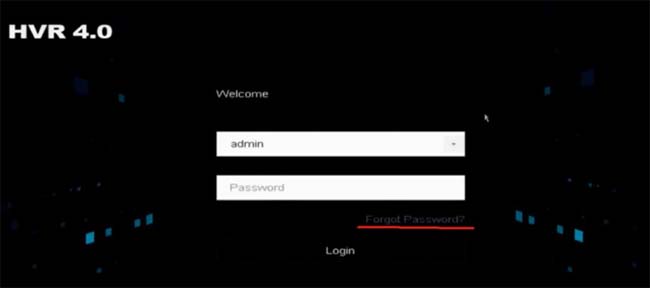 Choose the Verify by Hik-Connect choice.

On the following page, yous should see the screen beneath. This is the QR code that you need to use in order to reset the password. Continue this screen on so go to the Hik-Connect app on your telephone.

On your phone, run the Hik-Connect app and tap More > Reset Device Password.
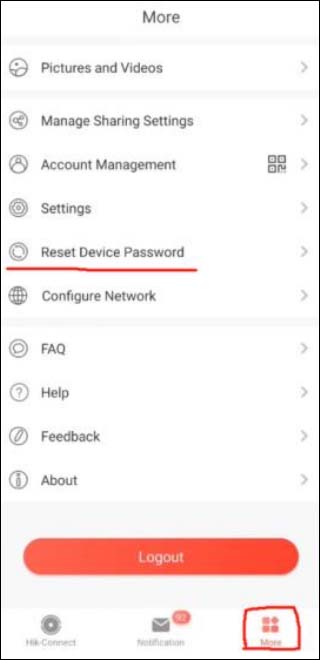 Signal the camera to the NVR's screen and scan the QR code of the previous step.

The verification code will show upward on Hik-Connect. It's a number lawmaking as shown in the example below.
 Go back to your NVR or DVR screen and enter Enter the verification code obtained from the app in the box below.
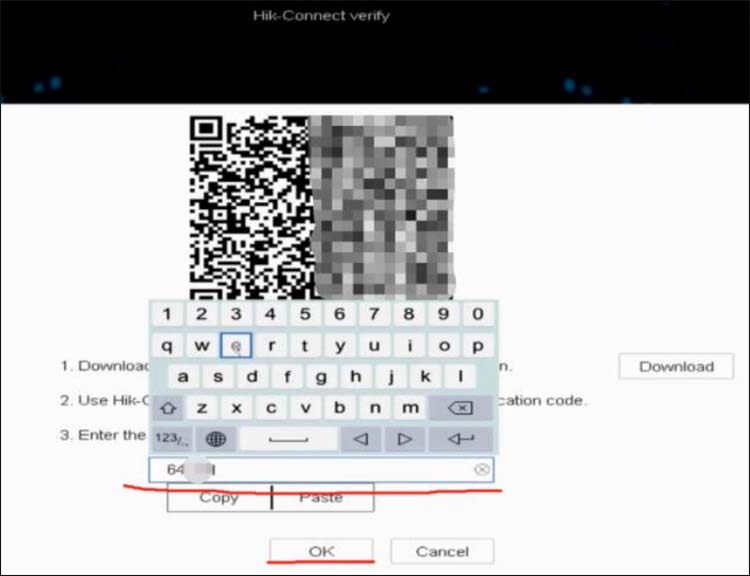 Click OK, then the system volition allow you to create a new password (as shown on the screenshot beneath). Now one the user tin can log in to the device successfully with the new countersign.
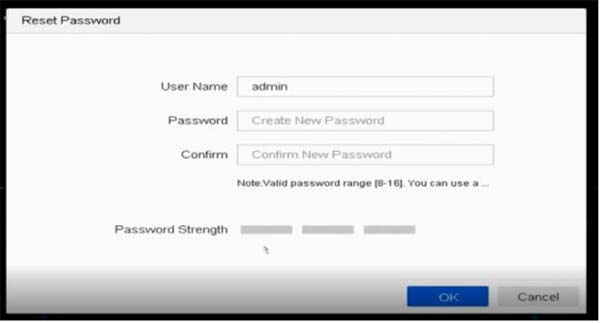
Proceed in listen that:
If the device has not been previously added to the app, Verify by Hik-Connect volition non show up. If then you should get an option that says "verify past email".
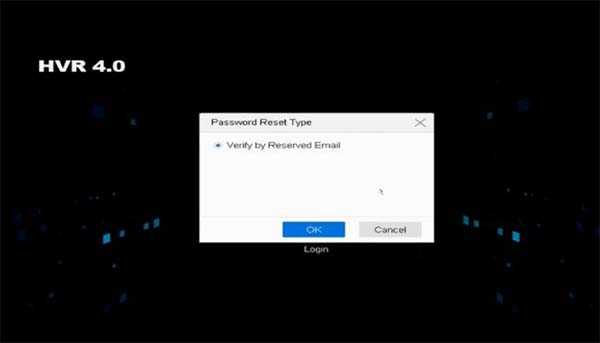 If the device is added by others, the QR code will not work and the following note will bear witness up in Hik-Connect subsequently scanning the QR lawmaking:

Conclusion
In this guide, we showed how to reset the password for a Hikvision IP camera, NVR, DVR. You need to know the serial number of the unit of measurement and the date of the system. The first two methods piece of work for sure models and firmware versions.
The final one works for any device equally long as yous export the Password Reset file and the seller or Hikvision sends yous a reset file inside the aforementioned 24-hour interval.
If you're stuck, nosotros'd recommend contacting the installer, Hikvision, or the visitor who sold yous the product. If y'all demand to get a new security photographic camera system, check out our recommendations.

Source: https://securitycamcenter.com/reset-hikvision-password/
Posted by: powellaffathe.blogspot.com
0 Response to "How To Create Unique Password In Hikvision Camera"
Post a Comment